

Your Network Room or Rack: 7 Steps to Keep It Safe, Cool and Organised
Almost every office, school, hotel and shop in Bhutan now has a small corner where the network lives: a wall rack, a cabinet in a store room, or a few switches on a shelf. It rarely gets attention until something stops working. When that corner is untidy, overheated or unlabelled, a simple fault can take hours to trace. Here are seven practical steps to keep your network room or rack in good order.
1. Give the equipment a proper home
Switches, routers, patch panels and any local server should sit in a closed rack or cabinet, not on the floor or on top of a cupboard. A lockable cabinet protects equipment from dust, accidental knocks and curious hands. Choose a location away from water pipes, leaking roofs and windows that let in direct sun or rain.
2. Keep it cool and ventilated
Network equipment runs all day and produces heat. A small, closed store room can become very warm, even in winter, which shortens the life of devices. Make sure air can move: leave space around the cabinet, keep its vents clear, and consider a fan or air conditioning if the room has no airflow. Remove boxes and old equipment that block ventilation.
3. Protect power at the source
Voltage fluctuations and power cuts are a common reason for damaged switches and corrupted servers. Connect core equipment through a suitable UPS and surge protection, and check that the UPS battery still holds a charge. Avoid daisy-chained extension boards inside the rack, and keep power cables separate from data cables where possible.
4. Label every cable and port
When a staff member says their computer is offline, the first question is which cable goes to their desk. Label both ends of each cable and every patch panel port with a simple scheme, for example room and point number. It takes an afternoon to do, and it saves many hours of guesswork every year.
5. Manage cables neatly
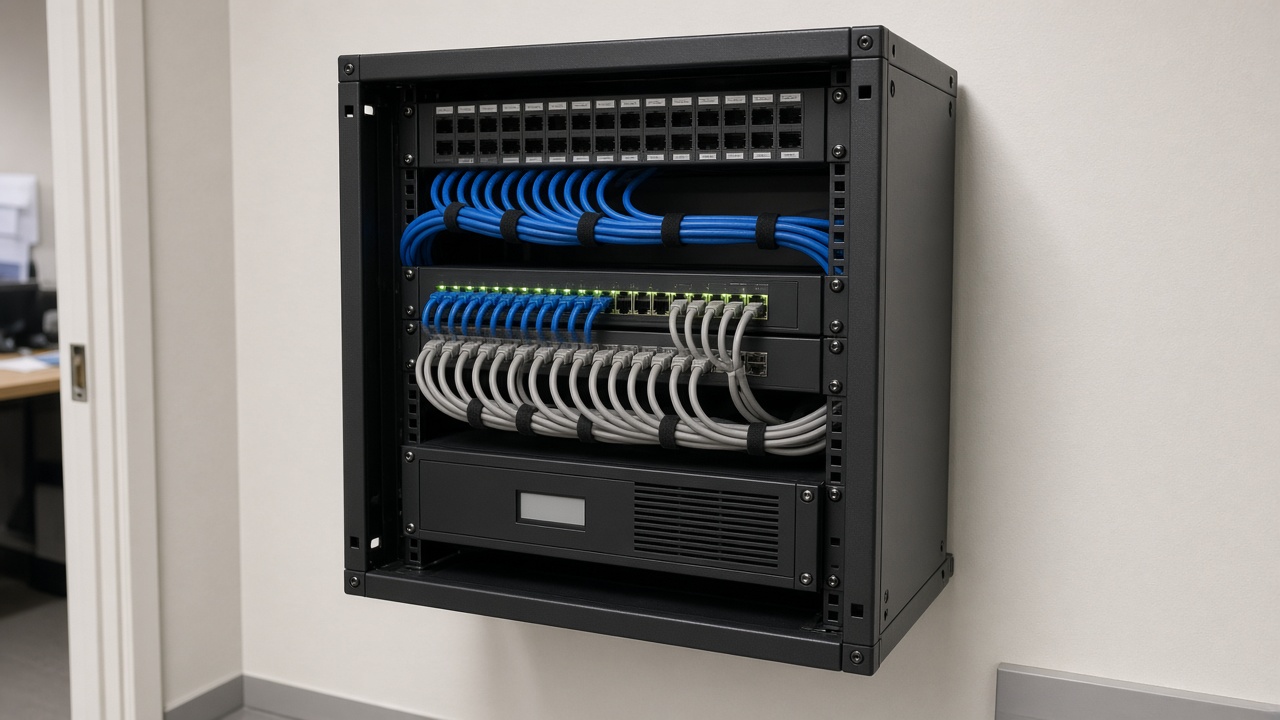
A tangle of patch cords makes it easy to unplug the wrong thing and hard to see status lights. Use cable managers, velcro ties and patch cords of the right length. Avoid tight bends and zip ties pulled too hard, which can damage cables. Remove cords that are no longer connected to anything.
6. Keep a simple network record
Write down what is in the rack: device models, what each one does, where uplinks go, internet connection details, and who to call for support. Keep a basic diagram showing how buildings, floors and access points connect. Store this record safely, with passwords kept separately in a password manager, so that a new IT officer or support partner can understand the setup quickly.
7. Check it regularly
Set a routine, perhaps once a month, to look inside the rack. Check for warning lights, unusual noise or heat, dust build-up, loose cables and UPS alerts. Make sure device firmware is kept up to date and that the cabinet stays locked. Small problems found early are much easier to fix than a full outage on a busy working day.
Need help organising your network?
eDruk Private Limited has supported ICT and network projects in Bhutan since 2004, including structured cabling, fibre links and network infrastructure. If your network room needs tidying, documenting or redesigning, our team can assess your setup and recommend practical next steps.
Contact us at edruk@edruk.com.bt, call +975 2 332277, or visit www.edruk.com.bt.